

Scripts
A script in Reminix is a command your team can run safely, from the app, the CLI, your own code or an AI agent. It has a name, an owner, and the JSON Schema of its inputs, which becomes the form people fill in and the input agents send. Its code lives in versions: every change is a new version, and runs use the one that’s published.
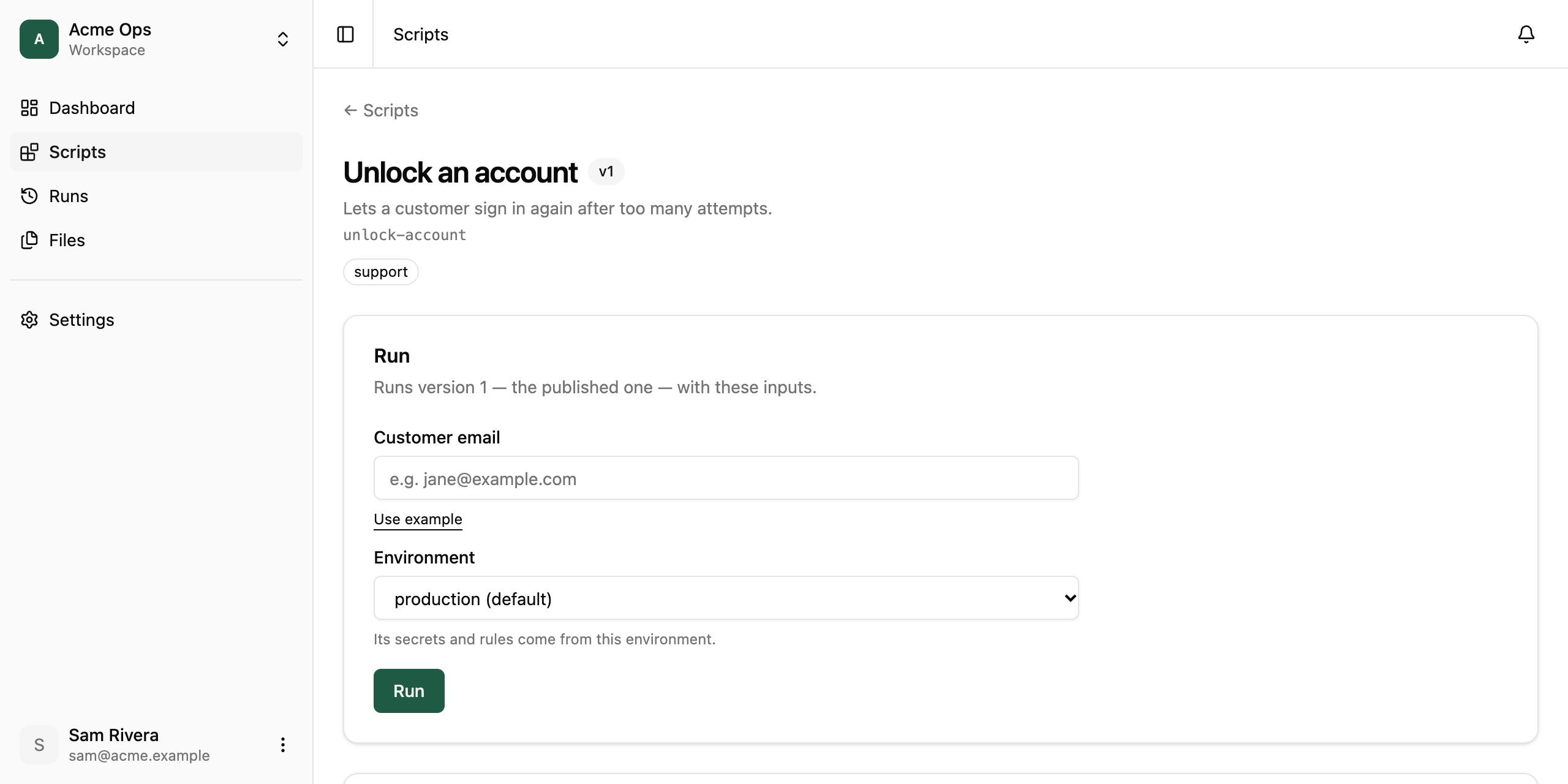
Publishing a folder
Section titled “Publishing a folder”A script is a command your team already runs, such as a Python
program, a shell script or a Node CLI, in its own folder. To publish
it, run reminix publish in that folder. Reminix reads the folder and
works out how to run it:
| The folder has | Reminix runs |
|---|---|
pyproject.toml with one [project.scripts] entry |
that entry |
pyproject.toml with a package that has __main__.py |
python -m <package> |
package.json with one bin, else scripts.start, else main |
node <bin>, npm start, node <main> |
one .py, .js, .mjs, .cjs, .ts, .mts or .sh file |
that file |
several, one of them main.py, __main__.py, index.js, index.mjs, index.ts, main.sh or run.sh |
that one |
no such file, but one executable file with no extension that starts with #! |
that file |
The script is named after pyproject.toml or package.json, else the
folder. Its dependencies install from requirements.txt (else
pyproject.toml) and package.json. For a script with inputs, give the
command with a {name} where each input goes:
reminix publish --plan # what Reminix found; uploads nothingreminix publish --command "python unlock.py {email}"When the folder doesn’t say how it runs, or says two things (two
scripts and no main.py), publish stops and names what it found: pass
--command, or customize it with a reminix.json (or ask your agent
to write one).
Customizing with reminix.json
Section titled “Customizing with reminix.json”Add a reminix.json beside the code when you want more than the
defaults: a form with labels, examples and types for its inputs, a
description and tags, the hosts and secrets it may use, a longer
timeout, or how to run and install anything the folder can’t say (Ruby,
Go, a custom install). Every field.
{ "slug": "unlock-account", "name": "Unlock an account", "description": "Lets a customer sign in again after too many attempts.", "command": "python unlock.py {email}", "inputSchema": { "type": "object", "required": ["email"], "properties": { "email": { "type": "string", "title": "Customer email", "examples": ["jane@example.com"] } } }}# unlock.py: the result goes to standard output, the log to standard error.import json, sys
email = sys.argv[1]print(f"unlocking {email}", file=sys.stderr)status = unlock(email) # your code, calling your app's admin APIprint(json.dumps({"unlocked": email, "status": status}))reminix init "python unlock.py {email}" writes this reminix.json for you, with a string input for each {name}, and a README.md. It never writes code. Then describe each
input’s title, type and description: they become the form people fill
in and the input agents send.
Add "tags": ["support", "accounts"] to reminix.json (up to 10, lowercase) and fill in the README.md. The script’s page shows the
README, and both help your team find it.
The command
Section titled “The command”Reminix runs the command directly, never through a shell, so an input can’t become another command.
- Words are split on spaces.
'…'and"…"keep spaces inside one word. Characters such as$,|,>and*are ordinary text. For a pipeline, writesh -c '…'or put it in a.shfile. - The first word is the program:python,node,sh, or a file in the folder such as./tool. -{name}is an input. A word that is only{name}becomes one argument, or one per item for a list. Inside a word, as in--email={email}, the value is put in place. -[ … ]is an optional part. Reminix leaves it out when an input in it is empty: missing, null,"", false or an empty list. A true/false input adds no argument of its own, so[--dry-run {dryRun}]adds--dry-runonly whendryRunis true. One optional part can’t hold another. - An input outside[ … ]has to appear inrequired.
Defaults and examples
Section titled “Defaults and examples”Two optional keys on an input help people run your script:
defaultfills the field in. Use it for a value that’s right most of the time. -examplesshows the first example as a hint in an empty field, with a Use example link that fills it in. Use it to show the shape of a value without choosing one for the person.
"email": { "type": "string", "title": "Customer email", "examples": ["jane@example.com"]}A file input can ship a sample file instead: see Ship a sample file.
Inputs, output and the log
Section titled “Inputs, output and the log”Your code gets its inputs three ways, so use whichever suits it:
- in the command, as above;
- as environment variables named
REMINIX_INPUT_and the input’s name in capitals, soemailisREMINIX_INPUT_EMAILand an input namedaccountIdwould beREMINIX_INPUT_ACCOUNT_ID. Strings arrive as they are, other values as JSON; - all together as one JSON object, on standard input and in the file
named by
$REMINIX_INPUTS. Nested objects and lists are easiest to read this way.
#!/bin/sh# unlock.sh, run with "command": "sh unlock.sh"set -eemail=$(jq -r .email "$REMINIX_INPUTS")echo "unlocking $email" >&2jq -n --arg email "$email" '{email: $email}' | curl -sf https://api.yourapp.com/admin/unlock -H "Content-Type: application/json" -d @-Standard output is the run’s result. Reminix keeps it as JSON when it parses as JSON and as text otherwise, up to 1 MB. Exit code 0 means the run succeeded. Any other exit code fails it, and the last lines of standard error become its error. Standard error is the run’s log, which the run’s page shows while it runs.
Dependencies and the machine
Section titled “Dependencies and the machine”When you upload a version, Reminix installs its dependencies once: a
requirements.txt with pip, else a pyproject.toml with
pip install ., and a package.json with npm (npm ci when there’s a
lock file; dev dependencies are left out). Only the
package registries are reachable during the install. To install some
other way, set "build" in reminix.json to your own command, which runs with sh -c in the folder. If the install fails, the upload fails
and shows its output. Runs never install anything, so they start fast.
Every run gets a fresh machine with Python 3.12, Node 22 (which runs
.ts files directly), sh, curl, jq and pdftotext. It has 1/4
of a CPU, 1 GB of memory and 4 GB of disk. Nothing carries over from
one run to the next.
Calling APIs
Section titled “Calling APIs”By default a script has no network. To call an API, list its hosts, and the secrets to attach to requests to them:
{ "hosts": ["api.yourapp.com"], "secrets": { "ADMIN_KEY": { "hosts": ["api.yourapp.com"], "header": "Authorization", "value": "Bearer {secret}" } }}# No key in the code: Reminix adds the Authorization header on the way out.import json, os, urllib.request
request = urllib.request.Request( "https://api.yourapp.com/admin/unlock", data=json.dumps({"email": os.environ["REMINIX_INPUT_EMAIL"]}).encode(), headers={"Content-Type": "application/json"},)with urllib.request.urlopen(request) as res: print(res.read().decode())- Requests go out only to
hosts, over HTTPS. A request to any other host gets an HTTP 403 at once, with a body that says why, and every request is a line in the run’s log. Python’surllibandrequests,curland Node’sfetchwork as they are. - Reminix attaches each secret only to itshosts, and only to those the secret’s value in the run’s environment allows (Secrets). The code never holds the value. One caution: an API that echoes your credentials back in its response would reveal them to the code, so don’t send secrets to one. valuedefaults to{secret}. Use it to add a scheme, as in"Bearer {secret}". -$REMINIX_ENVIRONMENTis the name of the run’s environment, such asproductionorstaging. Use it to pick an API’s test or live base URL, and list both hosts inhosts. - To read a secret as a plain value, list it in"env": ["NAME"], and the code gets it as the environment variableNAME. That’s allowed only for a secret whose owner turned on “Let scripts read the value itself”.
The script’s page shows each version’s hosts and secrets, so whoever publishes can see what it can reach.
Publishing
Section titled “Publishing”reminix publish ./unlock-account --draft # uploads a draft versionreminix publish ./unlock-account # uploads a version and publishes itThe CLI packs the folder as it is: the files git tracks, plus
new ones .gitignore doesn’t exclude, but never node_modules, .venv, venv, __pycache__, .deps, .git or .env. The packed
folder can be up to 10 MB.
The first publish creates the script. A draft changes nothing until a version is published, by the script’s owner or a workspace owner or admin. An agent’s publish becomes a request that a person approves. Publishing an older version again rolls back. See Governance for who can use a script, runs that need approval, and a second person for publishing.
To publish from your own code instead, with a key or token that has
scripts:write, see Upload a version
and Publish a version
under Endpoints. You pack the folder yourself there, as a base64
.tar.gz.
Archiving a script
Section titled “Archiving a script”Reminix never deletes a script. When you no longer need one, archive it: on the script’s page, select Archive script. An archived script leaves the Scripts list and can’t be run, and its schedules and triggers pause. Its runs, versions and files stay, so you can always see what it did and what it used. Tick Archived on the Scripts page to find it again, and select Restore to bring it back.
The script’s owner, or a workspace owner or admin, can archive and
restore it. Reminix refuses to archive a script while one of its runs is
going or waiting for approval. From the CLI: reminix scripts archive <slug> and reminix scripts restore <slug>.
Running it
Section titled “Running it”Once a version is published, anyone in the workspace who may use the script can run it:
- In the app: open it under Scripts. Its input schema is a form, and Run shows the output and the log.
- From the CLI:
reminix run unlock-account --input '{"email":"jane@example.com"}'prints the output. Add--logto print the log too. - From an agent: through the MCP server, every
published script is a tool with the script’s own name
(
unlock_account) that takes its inputs. - In another environment: with two or more, each of these can name one. See Environments.
- From your code:
reminix.run("unlock-account", { email: "jane@example.com" })with the TypeScript SDK, orreminix.run("unlock-account", {"email": "jane@example.com"})in Python. See Runs.