

Environments
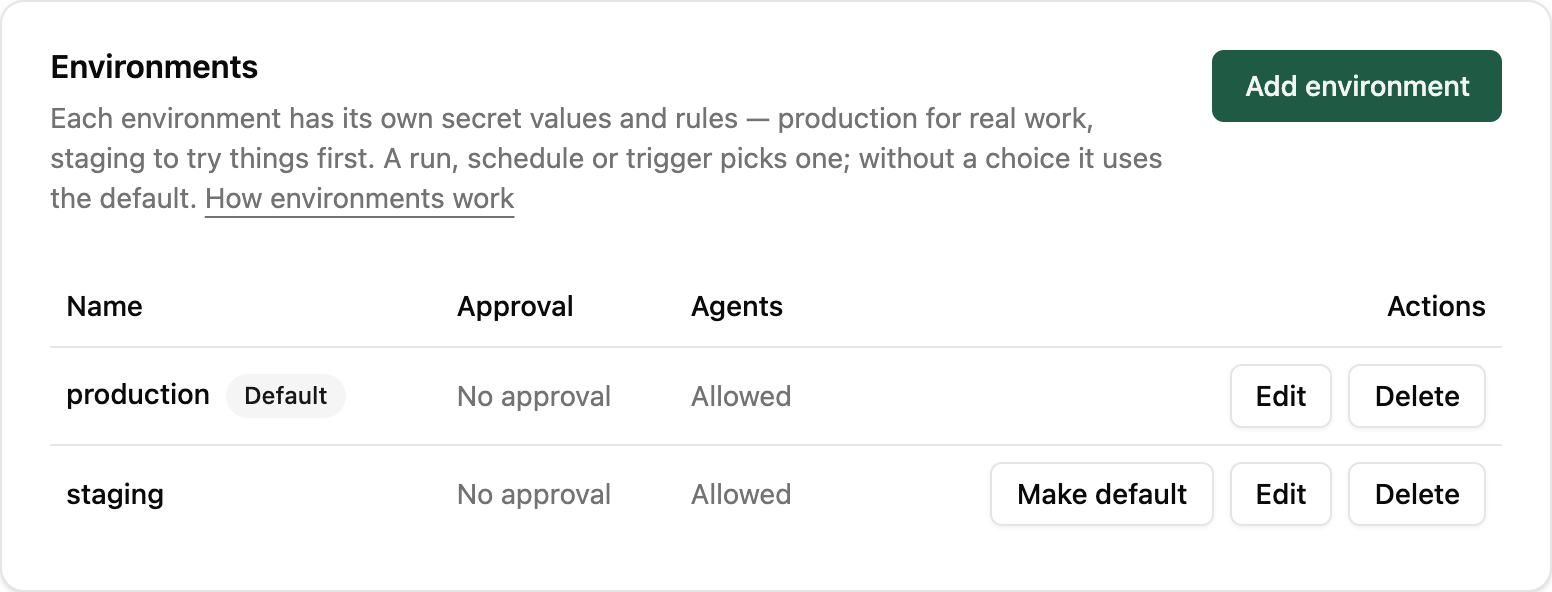
An environment is where a run happens: production for real work, staging to try things first. The nightly sync, for example, copies real orders in production and test orders in staging. Each environment has its own value for every secret and its own approval rules. The script is the same in each; only the keys and the rules change.
Every workspace starts with one environment, production. While it has only one, there is nothing to choose: runs happen in production, and the app, the API, the CLI and agents never ask.
Adding one
Section titled “Adding one”Owners and admins add environments in Settings → Environments → Add
environment. A name is lowercase letters, digits and hyphens, such as
staging or eu-test, up to 32 characters.
How many a workspace may have depends on its plan: Free includes
production only, and Team and Business include more (see
Plan allowances). At the limit, Reminix refuses a new
environment with 402 plan_limit_reached. If a workspace moves to a smaller plan, its
environments keep working; it just can’t add more.
Choosing one for a run
Section titled “Choosing one for a run”With two or more environments, every way of running a script can name one. Leave it out and the run uses the workspace’s default, production unless you change it with Make default.
- In the app: the Environment field on the run form, and on schedules and triggers.
- From your code:
createClient({ environment: "staging" })in TypeScript,Reminix(environment="staging")in Python, or theX-Environmentheader on any HTTP call. - From the CLI:--environment stagingon any command, orreminix environment use stagingto make it the default for later commands. Every answer says which environment it used, on stderr. - From an agent: each script’s tool takes an optional
environmentargument. See MCP server.
import { createClient } from "@reminix/sdk";
const reminix = createClient({ environment: "staging" });
await reminix.run("nightly-sync", { date: "2026-10-04" });
from reminix import Reminix
reminix = Reminix(environment="staging")
reminix.run("nightly-sync", {"date": "2026-10-04"})reminix run nightly-sync --input '{"date":"2026-10-04"}' \ --environment stagingcurl -X POST https://api.reminix.com/v1/scripts/nightly-sync/runs \ -H "Authorization: Bearer $REMINIX_API_KEY" \ -H "X-Environment: staging" \ -H "Content-Type: application/json" \ -d '{ "inputs": { "date": "2026-10-04" } }'The run records its environment, and the Runs page shows it. A script’s
code reads the name from the environment variable
REMINIX_ENVIRONMENT, for example to pick the shop’s
test or live base URL.
Secrets in each environment
Section titled “Secrets in each environment”A secret has one value per environment: the shop’s test key in staging, its live key in production. A run uses only its own environment’s value. If the value is missing, the run fails before it starts, and Reminix never borrows another environment’s value:
SHOP_KEY has no value in staging — add it in Settings → SecretsEach value lists its own hosts, so the staging value can go to a test
host such as api.staging.shop.example that production never calls. See Secrets.
Rules for each environment
Section titled “Rules for each environment”On Edit, an owner or admin sets two rules:
- Approval: no approval, agents’ runs need approval, or every run needs approval (Business; owners and admins don’t wait). A run follows the stricter of its environment’s rule and its script’s own policy, so production can require approval for runs that staging lets through.
- Agents: whether AI agents may run scripts there at all. An agent
that tries anyway gets
403. People can still run scripts there.
Limiting keys and agents
Section titled “Limiting keys and agents”Under Access → Can act in, an owner or admin can limit an API key or
a connected agent to some environments, for example a CI key that only
reaches staging. A limited key that names another environment gets
403. A key that can’t reach the default environment must send X-Environment on every call.
Deleting one
Section titled “Deleting one”Delete removes the environment and its secret values; the dialog says how many values go with it. Reminix refuses to delete the workspace’s only environment, its default, or one that a schedule or trigger uses. Move those first. Past runs keep the environment’s name.
For developers
Section titled “For developers”reminix environments list lists them, and reminix environments get <environment> reads one, with how many secret values, schedules and
triggers use it (see Environments
under Endpoints). Adding, changing and deleting them need environments:write, on a workspace API key or an
owner’s or admin’s token. Agents connected through MCP can only list
and read them.
The run.completed and run.failed webhook events carry the run’s environment, so a trigger can react only to production failures: "filter": { "environment": "production" }.